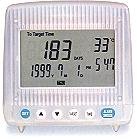
iClock
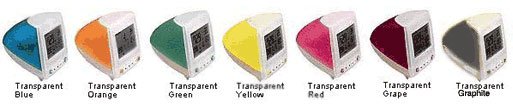

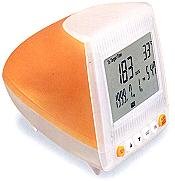
Hardware Description
-Push buttons
|
|
for entering the set mode. Also, use to
select the setting items. |
|
|
for increasing the value of setting items. |
|
|
for decreasing the value of setting items. |
|
|
for entering the count down mode. |
|
|
for entering the Time mode and toggling
the Lunar Calendar. |
|
|
for entering the alarm Mode or snooze
alarm. |
|
|
Operation
Normal Display Mode
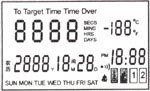
At Normal Display Mode, the unit will display the current Year, Month, Date,
Hour, Minute and Temperature. Also it will show the remaining time or days for the
count down function.
In case the unit entered the setting mode for 5 minutes without any key press, it
will automatically return to the ÑNormal DisplayS Mode.
Setting Time
At Normal Display Mode, press Set key to set the minute, Hour, Month, Date
and Year sequentially. After pressing the Set key, the corresponding item for setting
will be flashing. The you can press UP or Down keys to adjust the values.
Count Down Mode
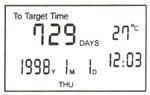
Press Target key to enter the Count Down Mode, the unit will show the current
Hour, Minute and Temperature. It will also show the remaining time or days the target
Year, Month and Date of count down. The remaining time relative to the target time
shows in the following ways:
- If days is greater than 1 day, it will show remaining days.
- If it is within 24 hours, it will show remaining hours.
- If it is within 60 minutes, it will show remaining minutes.
- If it is within 1 minute, it will show remaining seconds.
- If the count down function ended, it will show ----S. |
|
Setting Target Day for Count Down
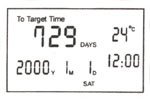
At Count Down Mode, press Set key to set the Minute, Hour, Month, Date and
Year sequentially. After pressing the Set key, the corresponding item for setting
will be flashing. Then you can press UP or Down keys to adjust the values. |
|
Alarm Mode
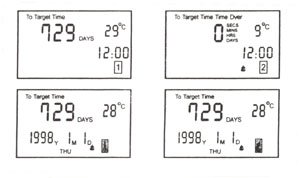
There are two daily Alarms labeled as 1 and 2, and the two Anniversary Alarms are
and .
Press the Alarm key can switch between these four alarms. After entered in the Alarm
mode, use UP or Down keys to turn the corresponding Alarm On or Off. |
|
Setting Alarms
At Alarm Mode, press Set key can set the Minute, Hour, Month and Date for the corresponding
Alarm. After pressing the Set key, the corresponding item for setting will be flashed.
Then you can press UP or Down keys to adjust the values for each Alarm setting.
* Birthday and Party Anniversary Alarms
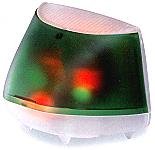
When the set date of the two Anniversary Alarm is reached, iClock will alert and
celebrate with the playing of many different songs at the following set hours during
that day and with flashing multicolor LED strobing to alert you and celebrate with
you. |
 |
For Birthday Alarm, the song Happy Birthday will be played at the following set hours
during that day.
For Party Anniversary Alarm, different songs will be played at the following set
hours during that day.
| 8am |
song #1 |
| 9am & 10am |
song #2 |
| 11am & 12 noon |
song #3 |
| 1pm & 2pm |
song #4 (Happy Birthday) |
| 3pm & 4pm |
song #5 |
| 5pm & 6pm |
song #6 (Wait For You) |
| 7pm |
song #7 |
|
 |
Note: iClock will reset upon changing of battery or when installing the battery at
the first time. Upon supplying with power, iClock will play a music tune, flashes
LED lights and does a self diagnostic.
IMPORTANT WARRANTY NOTES:
As a gift item, iClock is has a 30-day limited warranty (replacement or repair only)
against functionality defect or workmanship from the date of purchase from us. This
limited warranty voids with any sign of misuse or abuse is detected.
iClock is basically a sophisticated piece of electronic device, that should be care
for with the same manner as to any other electronic devices. Common sense will tell
you not to submerge this unit into water, drop, abuse or physically bouncing, hitting,
or pounding or damage it physically in any way. Warranty will Void automatically
if the unit has any sign of damages due to foreseen or unforeseen reasons. Warranty
only applies to repair or replacement of the unit in the event if the unit fails
to function due to defect or workmanship. No any other warranty is offered and applied.
iClock is a delicate piece of equipment that if used and handled properly will bring
you convenience, joy and provide information you need for years to come. So, set
it up per your needs and enjoy.
Copyright ©2000 Posh International. All rights
reserved.